My Headlines

Showing posts with label windows vista. Show all posts

Saturday, August 18, 2007

Mac Users don't just switch from Windows..

by Don Burnett

I found this amusing post by Nik Cubrilovic of OmniDrive. I have also seen his writing at TechCrunch.. Apparently back in May he made the "SWITCH" but not the way the marketing folks have you programmed to think. His Mac crashed and he couldn't get back the partition, so he made the switch to Windows Vista. This is a comment from his blog...

Nik Cubrilovic:

"I didn’t expect it to be like this, I didn’t want Vista to be this good - I was expecting to boot back into OS X and living happily ever after, but damn, this is one fast, slick and nice operating system. If you are a Mac user try it yourself, install boot camp and Vista and it will feel like you just added another CPU and doubled your RAM - I can’t see any evidence for any of the reports of Vista being slow or power-hungry.

Some surprises I have had since running Vista: the first was when I ran Media Center (which has been updated with a new interface and with new features) it detected the Xbox 360 and the other Media Center on the network - making it easy to stream and share music and video content. Media Center is also a much nicer and richer experience than Frontrow. The default security model is much better than what it was. As somebody who has published over a dozen security vulnerabilities for Windows I can see how the new security initiatives within Microsoft that started 4-5 years ago have really taken hold in every part of the operating system and applications - IE has gone from being a hacked up toy to a serious browser that keeps users safe from themselves. "

Another happy Vista user running on Apple Hardware..

Apple iPhone Applications on your Windows Start Menu! How Cool...

by Donald Burnett

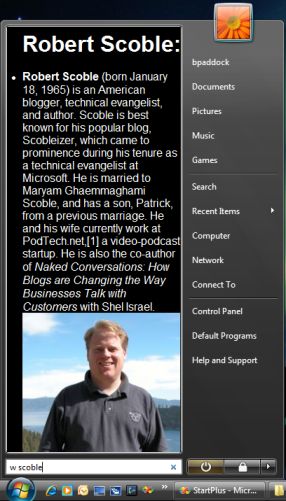
Big thanks to Jeff Sandquist for the tip-off on this one. One of the Microsoft guys has been at it again, you can now place "gadgets" in your Windows Start Menu, it's Called Start++ and it's thanks to one of the ultra-cool Microsoft employees Brandon Paddock. What are you waiting for you can download it right here.

Release 0.7x of Start++ not only lets you put gadgets, but now iPhone Applications, yes you heard that right, iPhone applications. Since Apple decided to keep the iPhone Web 2.0 friendly Brandon found a way to incorporate these right into Start++.. There are more all the time, if you want a big list and want to play with the iphone application manager check out the iPhone Apps manager by Matthew Peach. You will be surprised at how useful this whole thing is.

Here is the Scobelizer again Wiki Immortalized in the START menu..

One of the reasons I think Brandon is ultra-cool is he also thinks about others. He is actually involved in trying to save Aids Oprhans in Uganda.. The license for Start++ is careware and requires a donation: In the license it states:

"The software on this site is made available for free, however I ask that if you find it useful that you make a contribution of any size to Tusubira - the Uganda aid organization I helped start with four UW students last summer. I and 10 other volunteers be visiting Uganda with Tusubira at the end of this summer to work with the Ugandan organization "Save The Aids Orphans" (STAO). All advertising revenue on this site and BrandonLive.com is currently going to help cover travel expenses for students on the team.

If you choose to donate, your contribution will be used to help our current project, expanding the STAO orphanage in Mafubira, Uganda - or to purchase food for the orphans living there... Tusubira is a registered 501(c)3 non-profit organization, contributions are tax deductible. "

How cool is that, if you don't support his efforts well shame on you. This is a great thing he is doing, and it's a discrete way to save the world one person at a time.

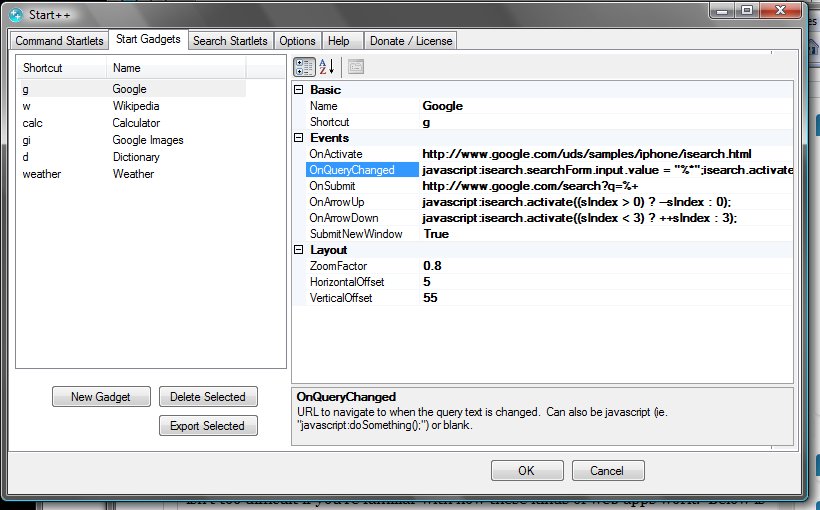
If you are interested in how easy it is to set-up gadgets in Start++ please check out this interface, pretty easy huh?